
Office: +27 066 1729 527

Sales Order Picking & Dispatch
Optimize your order fulfillment with Pointscan’s simplistic but powerful picking and dispatch tools. PointScan ensures efficient, real-time item tracking from warehouse to delivery.
Eliminate costly picking errors, accelerate dispatch, and deliver the right product, on time—every time.
Fast, Accurate Order Fulfillment for
Your Warehousing
Pick Slip Issued & Order Initiation
A picking slip is generated from PointScan
The picking operator receives the slip and scans the barcode on it to begin the pick order.


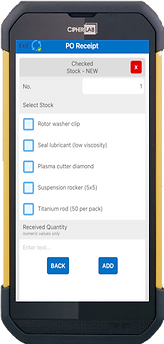

Item Identification & Picking Confirmation
The operator proceeds to the storage location.
Stock/SKU barcode is scanned to confirm the correct item.
Quantity is manually entered to confirm the number of units picked.
Pick Completion & Handover to Dispatch
Once all items for the order are picked and confirmed, the operator proceeds to the dispatch area.
The picked order is handed over for final validation.
Dispatch Validation & Loading
A dispatch operator scans each picked item’s barcode against the original order.
The system confirms accuracy of items and quantities.
Once verified, the order is approved for loading onto the truck for delivery.
Avoid These Common Stock Take Mistakes
Even with the best tools, process matters. Here’s what PointScan helps you avoid:
-
Relying on Outdated Manual Systems
Spreadsheets and clipboards cause confusion, duplication, and human error. PointScan replaces all that with real-time scanning and cloud-sync.
-
Poor Planning = Inaccurate Counts
A rushed or unplanned stock take leads to staff burnout, miscounts, and misalignment. PointScan allows you to count by area, item —making planning simple and execution smooth.
-
Counting the Wrong Stock
Without live data from your ERP, you might count stock that’s already picked or dispatched. With PointScan you wont count phantom inventory.
